Archive | Golden Nugget

QB2CRM – QuickBooks and GoldMine Integration

Posted on 04 January 2010 by Bob Ritter

This issue’s Golden Nugget is not about any one customer, but a general need that people have for integrating their GoldMine CRM with their Accounting or ERP data. First Direct has been called upon by many customers to do this from ACCPAC to Macola to vertical applications such as eQuantum for the distribution industry. But far and away the most popular application for small to midsized businesses is Quickbooks. For that reason we have developed a solution which answers the needs of many organizations using GoldMine and Quickbooks, we call it QB2CRM.

Finally there is an economical and ready to go way to integrate these two popular solutions by giving users many benefits, including but not limited to:

  • Creating and linking records in either system from the other
  • Viewing QuickBooks invoice history from GoldMine
  • Launching from GoldMine to QuickBooks Account or Invoice
  • Reporting & analysis possibilities
  • Fast and flexible data integration
  • Limit access to your QuickBooks data

Our customers are happy with the results and First Direct Corp is adding new capabilities for purchasing managers. Because of the built in flexibility of QB2CRM we are able to do customized implementations, tailored to specific customer requests such as a tie in with sales orders and opportunities and a way to roll-up to Quickbooks jobs. Given how we are accessing the data the possibilities for custom reporting and analysis and unique use of your accounting data from within GoldMine is possible. Aligning your CRM with your accounting helps your organization operate more effciently and smarter. It’s another great way to move from “Survive to Thrive” in the new year. We invite customers to share their needs and ideas.

If you’d like to learn more click here to request more information or register for our upcoming online webinar presentation.

If you are not using QuickBooks contact us for other integration options.

Comments (0)

Tracking Referrals

Posted on 07 August 2009 by Bob Ritter

If you’re new to GoldMine or an old-time user like me, there’s always something new to learn.  This situation was brought to us by a customer recently and they needed a solution.  It’s a common practice in many businesses to offer an incentive for referrals from customers.  Have you come up with a good way to track them?  We have!

Here’s the scenario.  Your customer calls and says they have someone in mind who they think would be interested in your product or service.  You would like to send that customer a letter thanking them for the referral and letting them know there will be a gift sent to them if the referred prospect actually closes.  You then need to track the referral and when it closes, send the gift with a cover letter.

Following these steps, we can record the referral in Goldmine and update it:

  1. Go to the Customer record that gave you the referral.
  2. Click on the Referral tab to bring that tab into focus.
  3. Right click in the body of the tab and choose New
  4. The Contact Search center appears.  Use this box to search for the referred Prospect and click Select.
  5. The Referral Link tab is exposed.  Type in a value in both Reference fields or select from the drop down list provided describing what the referral was for.  Also, use the notes for any additional information.
  6. On this same screen, there are 2 other tabs located across the top.  Click on the Status tab to expose it.  Here Goldmine gives you the ability to track the progress of the referral by clicking the box indicating where they are in the referral process as determined by your best practices.
  7. Click OK to record the Referral.  It will look like this in GoldMine’s Referral Tab.

From this point, the end user will right click and edit the referral and use the value chosen in the Status tab to indicate where they are in the sales process.  When the sale is completed, the box for ‘Done’ is checked in the Status tab and the gift is sent.

That’s all well and good you say. But how do I get to that data so I can send the letter, follow the progress and update them so the next letter can print when it does close?  We have designed a Crystal Report to track the progress based on the date the referral was input into GoldMine.  Here’s a sample:

In this report, the grid at the right indicates where they are in the referral process.  The next Crystal Report also uses a date range to select which letters to print based on the date the Referral was input.  Also, you’ll notice the letter is personally addressed with the Dear field used in the salutation.  Further in, the referred Prospect’s company name is in the first paragraph. 

The final letter is similarly laid out, but the selection depends on the ‘Done’ value being checked and the data range keys off of the Last Updated date of the Referral.

 I hope that gives you a glimpse of some of the powerful, behind-the-scenes ways of using the GoldMine you’ve been using all along.  If you’re not sure it can be done, give us a call and ask how we would solve your problem!

Comments (0)

Details Plus – Get More Out of Details

Posted on 07 March 2009 by Jay Dymond

GoldMine’s Details tab has always been an area with great potential for customization and can be used to solve many common data storage problems. It makes sense to use a custom detail, rather than a custom field, any time there is a one-to-many relationship between a contact and some type of data. Each detail can have its own tab so all like details can be displayed together. Each detail also has a Reference text field, a Notes box, and up to eight additional text fields (of preset lengths) that can be renamed to suit your needs. 

For many applications, a simple custom GoldMine detail is all that is needed. However, there are a few limitations that one has to live with. First, you are limited to the number of fields mentioned above (Reference, Notes, plus eight text fields). You only get one note/memo field and you cannot force proper date or numeric data entry for any of the fields. Second, GoldMine does not provide an easy way of filtering/querying contacts based on their detail data. In order to do this in GoldMine you would have to become familiar with writing complex SQL (Standard Query Language) queries, something that only computer programmer type users would likely be able to handle. Third, there is no way to change the field layout of the custom detail window. It is of a set size and shape, and the order/position of the fields cannot be changed.

Luckily, there is a GoldMine add-on product called Details Plus that gets around the above drawbacks. Not only does Details Plus resolve these issues, but it has additional features that really enhance the power of GoldMine’s details. Here’s a quick list of things Details Plus can do that go above and beyond what is standard in GoldMine:

  • User configurable screen layouts for manual or web import data capture.
  • 5 extra fields with user designation as character, date or numeric.
  • Calculated and default field values.
  • Direct merge capability to Word or email templates.
  • Fast queries on any combination of details fields.
  • Build GoldMine Groups
  • Data export to common file formats

I’d like to quickly share a real-life example of a GoldMine/Details Plus customer who has put these features to use. Shanequa Stephens at American Business & Professional Program, a New York based insurance solutions provider, has used GoldMine details to keep track of client insurance policy information. Details Plus allows her to keep an extensive amount of information regarding each policy and enables her to layout that information on the screen exactly how she wants to see it. Shanequa also has various GoldMine reports that allow her to print and email this information to both insurance carriers and the company’s clients. And Details Plus makes it easy for her to query the information. Each month she uses Details Plus to create a group of contacts whose policies are to expire next month, to which she can send reminder Emails or printed letters for renewal notices. Details Plus takes an already good GoldMine feature and makes it great.

Comments (0)

Feedback from a Customer

Posted on 07 September 2008 by Jay Dymond

Listen to another customer!

Here is what Tracey had to say about her upgrade to GoldMine Premium …

Recently First Direct Corp. helped our customer (Integrated Marketing Concepts, Inc.) to upgrade from GoldMine Standard to GoldMine Premium.  The GoldMine Administrator, Tracey, is a very capable person which makes her feedback that much more credible.  We’ve had a lot of positive feedback from customer, but this particular email is as good as it gets and it should offer up encouragement for those who are still considering the decision of whether to upgrade their GoldMine.  With her permission I’ll quote her verbatim below:

Bob,

The transition has been much smoother than I’d anticipated, Thank Heavens!  I was doing the “Prepare for the worst, hope for the best” thing with all of this b/c I just wasn’t sure…  But it’s been a wonderful change!  My users like the GUI so much better and they’re all so excited about poking around that I can’t keep up!  LOL

I’m still doing a little “behind the scenes” clean up of course; call it re-organization if you will.  So for the time being I’m going to say no thanks to the training, but I’d like to keep the option of future training and assistance if I may, please.

My users are actually calling me and saying, “Wow!  Did you know you can… now?  That’s great!”  So they’re thoroughly enjoying scoping things out, and that way I can focus on the changes I need to make.  It’s really nice to give them something they like so much that they want to learn on their own for the time being.

Again, thanks much to you and Max (he’s terrific!) and I’m sure I’ll be catching up with at least one of you in the future for some assistance.

Thanks,

Tracey Bethel
Integrated Marketing Concepts

Comments (0)

Customer Service Delivers ROI

Posted on 01 July 2008 by Jay Dymond

A GoldMine customer was looking for reasons to upgrade from their Corporate Edition GoldMine to Premium.  With 21 users they were concerned they could justify the investment in software and services.   Demonstrations and discussions were enough to convince them that it was the right move and they opted to move forward with the purchase through First Direct Corporation. 
After six months I (Bob Ritter) interviewed the customer to see if they believed they made the right decision.  Here’s a bulleted list of what my customer said to me:

  • The Case Management capabilities and the Service Center have helped us to be far more efficient and focused
  • The ability to create, escalate and move a case around is a great help for us to work as team
  • The interface is very easy to use
  • Our engineering department, with eight engineers, is able to set and focus on priorities. We’re continually updating priorities and sorting cases this way so we address the most important needs
  • Our phone support people are tracking calls from 11K franchise customers using support templates to make sure our cases have continuity and thus reporting.   Templates are associated with types of issues we troubleshoot.
  • Thanks to the new capabilities and improved user interface of GoldMine overall, the level of usage of GoldMine has risen overall

With the added benefits in Premium Edition there  is greater interest in using GoldMine more fully in other ways.  We envision greater use of the Details Tab for tracking products owned, the Knowledgebase for procedures, Pipeline Management, Automated Processes, and more.

Thanks to GoldMine Premium Edition there is greater commitment to using CRM technology throughout the company.  Our  customer summed it up best when they said, “We are happy with the ROI – and glad we made the decision to upgrade to Premium with First Direct Corp!”

Comments (0)

RSight Takes GoldMine to the Next Level

Posted on 07 March 2008 by Jay Dymond

Our Golden Nugget this issue is about company called RSight Investigations, Inc.. (http://www.rsight.com)  As their name implies, RSight provides investigative services to the insurance industry, employers, TPAs, and others.

The RSight organization started using GoldMine since its inception in 1999.  The customer had originally contacted First Direct back in Sept. of 2003, however, as it turns out they purchased GoldMine from another vendor.  In 2007, RSight decided it was time to take GoldMine to the next level and they turned to First Direct to help make it happen. 

One reason they remembered First Direct was that they had received marketing communications from them ever since their initial inquiry. This impressed decision makers at RSight who saw that First Direct was knowledgeable on how to market effectively with GoldMine.

Sandra von Eschenbach saw what their organization could do with GoldMine Premium as a result of a couple demonstrations by First Direct and the firm moved forward with an upgrade of their 28 user GoldMine system through First Direct Corp. 

With First Direct Corp.’s support, RSight has developed a dramatically new approach to using GoldMine to meet the needs of their complicated workflow.  The changes to their GoldMine configuration enable them to improve operating efficiency and customer satisfaction.  According to Sandra, “With the use of Record Typing, redesigning our Primary Views, and creating considerable number of specialized SQL Queries the organization can access information more quickly and use it to enable our staff to focus on their activities.” 

To overcome some unique database challenges, and better communicate with clients, RSight deployed EmailRush and MasterMine.  Steve Cassell, President, says, “We attribute First Direct with innovative ideas and solutions to help us achieve our objectives through GoldMine.”
                          
Sandra adds, “What we are doing today with GoldMine would not have been possible without the upgrade to Premium Edition and the assistance of First Direct.  They have been fantastic!”

Read the case study

Comments (0)

wMobile – Wireless CRM

Posted on 12 December 2007 by Jay Dymond

The wMobile product enables users to have live wireless access to a GoldMine based CRM system from their handheld device.

Users can access all contact information contained on a GoldMine contact record including information in customized GoldMine fields. Users can add and edit contact information with updates instantly available on the live GoldMine database all from their handheld device.

Comments (0)

DbNetGrid

Posted on 07 July 2007 by Jay Dymond

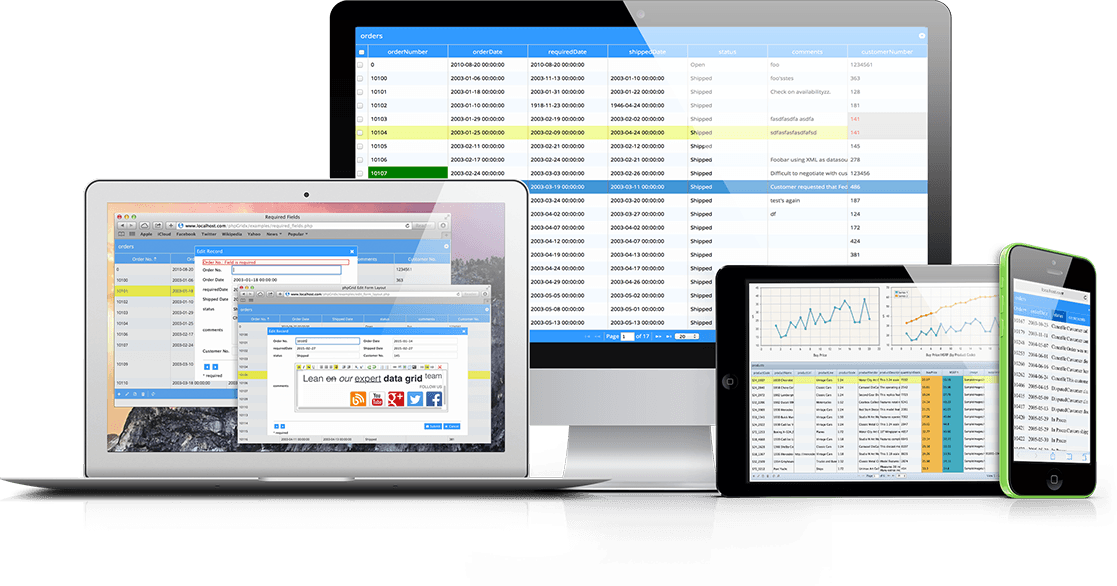
DbNetGrid is a fully encapsulated AJAX enabled grid component designed for use in Intranet/Internet development. It provides a fast and flexible way of presenting and updating database information in a browser environment. DbNetGrid can be used as a simple grid component integrated with your own applications, a web-reporting tool or as part of a fully functional web-application. No need to write any code.

Using GoldMines’ GM+View Tab & Browser you can display your DbNetGrid applications inside of GoldMine. DbNetGrid is a great solution for anyone who need GoldMine reports, or who wants to view non-GoldMine database information inside of GoldMine. For example, give your GoldMine users access to your customers accounting information by displaying accounting database information inside of a GM+View using DbNetGrid.

DbNetGrid can be added easily to existing HTML/ASP or ASP.NET in a few seconds and can be used in conjunction with tools such as VS.NET and Dreamweaver MX. A simple DbNetGrid application can be configured with as little as 3 lines of code. Grids can be generated from the DbNetGrid::Designer interface.

DbNetGrid has a massive array of capabilities that you can activate with a few lines of code saving hundreds of man-hours of development time. Some of these capabilities include:

■Update, insert and delete records (including custom validation).

■Point and click re-ordering.

■Search dialog (with the ability to use the full range of SQL relational operators)

■Ability to export results in HTML, Word, Excel or XML formats.

■Create charts using MS Excel

■ Save and restore run-time configuration with User Profiles.

■ Supports totals and sub-totals.

■Link to MS Word and perform automated mail-merges

Comments (0)

Campaign Tracker

Posted on 04 December 2006 by Jay Dymond

Campaign Tracker is an email newsletter tool built for those who want to send and track their own email campaigns. We design a template and you log in to your own account to manage your subscribers, create and send your own emails and view reports on the results.

Reports you will actually understand Our simple reports make it easy for you to check out the numbers that matter. Manage your own subscribers with ease – the system handles the unsubscribes and bounces for you. Elegant reports on the success of your campaigns let you easily see who opened, who clicked, who bounced and who unsubscribed. You can even search for a specific subscriber to see exactly what they did with the email.

Comments (0)

A Clear Vision

Posted on 25 August 2006 by Jay Dymond

At First Direct Corp. we discuss CRM needs with literally thousands of individuals and organizations. Some prospects and customers are very unsure of their sales processes, while others have done a better job of defining things. The customer who is the subject of this issue’s “Golden Nugget” impressed me from the very beginning with their clear vision for how their sales qualifying process needs to be tracked.

Terry Chapman, President of Business Electronics Corp. (BEC), has broken his organization’s sales qualifying processes down into very specific steps which represent milestones. The reps know what is required at each stage so they can concentrate on achieving success. For example, obtaining the expiration date of an equipment lease or the contact information on the right decision maker is essential in order to time and direct future follow-up, so to move from one stage in their sales processes to the next, this information needs to be captured..

First Direct worked with Terry to map BEC’s methodology into his GoldMine CRM system. Important information is tracked, and by using GoldMine’s auto-update feature, the system automatically captures the dates each sales milestone is achieved. Terry can analyze the results of his marketing & sales efforts more accurately, and knows where prospects and opportunities stand. Now, BEC is able to trigger automated communications and scheduled follow-up actions based on the qualifying information.

GoldMine is a great tool; however, to truly achieve desired results with any CRM solution, the people who implement it must have a clear vision for how it is to be used. It helps you to achieve success if you can define it in very specific ways with milestones and “begin with the end in mind!”

Business Electronics Corp. has been serving BirminghamAlabama businesses since 1988 through a dedicated team of service professionals that know how to address the document reproduction and management needs of businesses. Visit BEC online at http://www.businesselectronics.com

Comments (0)